
Most losing trades don’t start with a bad strategy. They start with bad information management.
You’ve probably experienced it before. EUR/USD breaks a key level, you jump into the trade, and seconds later realize the move is running directly into higher timeframe resistance you never checked. Or you’re staring at six charts, multiple indicators, economic headlines, and a Discord channel, yet still miss the cleanest setup of the day.
The problem is not that there aren’t enough displays.
It’s that most traders construct their workplace around information rather than decisions.
Professional day traders don’t win too much because they view more charts. They win because their screen architecture filters out noise, prioritises context, and helps them perform faster with fewer mistakes.
This post is about developing the architecture of a trading screen that makes the quality of decisions made better, not just presenting more data. Each lesson stems from real trading experience, research and routines that actual forex traders may put to use immediately.
Why Screen Layout Matters More Than Most Traders Think
Trading is largely a cognitive exercise. Every additional chart, indicator, or notification competes for attention.
American Psychological Association research on cognitive load demonstrates, repeatedly, that the more unneeded information there is, the worse the decision. For example, studies on attention switching from the Massachusetts Institute of Technology (MIT) show considerable reductions in productivity anytime people are switching tasks all the time.
For day traders, this translates into slower reactions, emotional decisions, and lower-quality execution.
The CME Group, in its educational materials on futures trading and market structure, also emphasizes that context across multiple timeframes helps traders understand price movement rather than reacting to every candle.
These findings reinforce what experienced traders eventually discover.
Your layout should reduce thinking, not increase it.
The best screen layout isn’t the one with the most information. It’s the one that answers your next trading question immediately.
The Biggest Mistake Traders Make When Building a Screen Layout
Most beginners organize screens around charts.
Professionals organize screens around the workflow.
Those are completely different approaches.
Instead of asking:
“What should I display?”
Ask:
“What decision am I trying to make right now?”
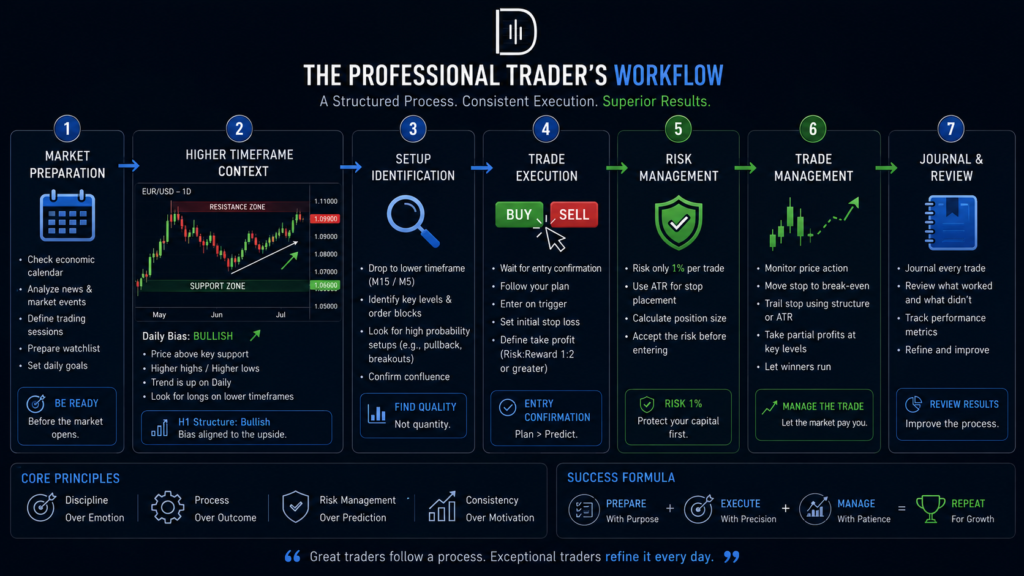
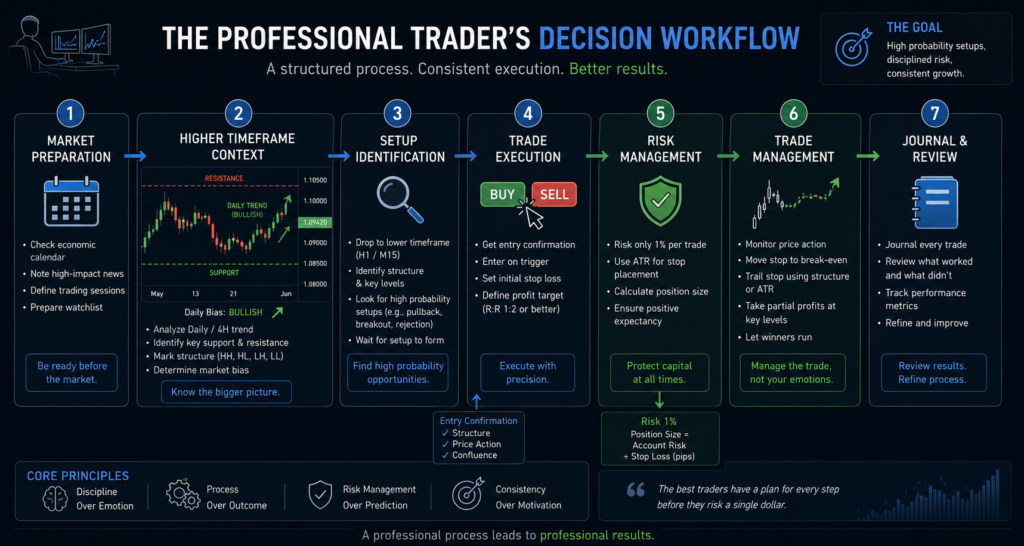
Every trade follows roughly the same sequence.
Market preparation.
Context.
Set up identification.
Execution.
Trade management.
Review.
Your screen layout should mirror that sequence.
If information appears before it’s needed, it becomes a distraction.
If information appears after it’s needed, it’s already too late.
The One Monitor Layout
A surprising number of consistently profitable traders still trade from a single monitor.
Not because they cannot afford more screens, but because they know exactly what deserves attention.
The center of the screen should contain the execution timeframe, whether that’s the 5-minute or 15-minute chart.
To the left, keep the higher timeframe, typically the 1-hour or 4-hour chart, providing directional bias.
Below or beside the main chart, display your watchlist, open positions, and economic calendar.
Reserve a small area for order execution.
Nothing else.
No social media.
No YouTube.
No Telegram alerts.
No unnecessary indicators competing for attention.
This layout works particularly well for traders focusing on one or two currency pairs.
The Two-Monitor Professional Setup
Adding a second monitor isn’t about displaying twice as much information.
It’s about separating analysis from execution.
The first monitor becomes your decision screen.
This includes higher-timeframe charts, trend analysis, major support and resistance zones, a volume profile (if you use it), and your watchlist.
The second monitor becomes your execution screen.
Here you’ll place your entry timeframe, order management, economic calendar, news feed, and trade management tools.
This separation prevents one common psychological mistake.
Many traders accidentally adjust their analysis after entering a position.
Keeping execution separate helps maintain objectivity.
The Three Monitor Active Day Trader Layout
Three monitors become valuable when you’re actively scanning multiple forex pairs during the London and New York sessions.
Monitor one should focus entirely on the market context.
Daily charts.
4-hour charts.
Session highs and lows.
Dollar Index if relevant.
Bond yields influence your strategy.
Monitor two becomes the active trading screen.
This is where execution happens.
Only display the pairs you’re actively considering.
Monitor three becomes your information hub.
Economic calendar.
News terminal.
Trade journal.
Position sizing.
Performance metrics.
Notice what’s missing.
There are still no unnecessary indicators or twenty different oscillators.
Professional layouts prioritize clarity over complexity.
Multi-Timeframe Layout Without Information Overload
Many traders misunderstand multi-timeframe analysis.
They believe that more timeframes lead to better analysis.
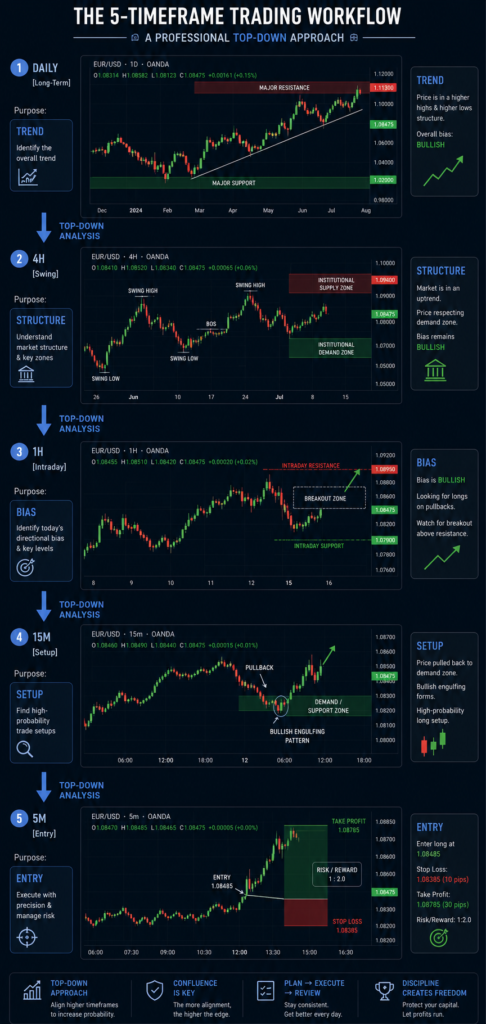
In reality, each timeframe should answer one specific question.
The Daily chart asks:
Where is the broader market likely heading?
The 4h chart is asking:
Where is the institutional set-up?
The 1-hour chart poses:
What is the direction bias today?
The 15 minute chart asks:
Is a set-up in the cards?
The 5-minute chart wants to know,
Is this execution justified now?
When every chart has a defined purpose, analysis becomes much faster.
Without defined roles, traders search across timeframes until one confirms what they already want to do.
That’s confirmation bias disguised as analysis.
The Best Layout for Scalpers
Scalpers don’t need large collections of charts.
They need speed.
Execution latency matters more than the quantity of information.
A scalping layout should prioritize:
A large execution chart.
Level II or DOM if applicable.
One higher timeframe chart.
Spread monitor.
Open the position panel.
Economic calendar.
Everything else becomes secondary.
The fewer eye movements required before clicking Buy or Sell, the better.
The Best Layout for Intraday Swing Traders
Intraday swing traders have different priorities.
Instead of speed, they need context.
Larger, higher-timeframe charts become more valuable than ultra-fast execution panels.
This layout should dedicate more space to trend analysis and structure while reducing emphasis on short-term price fluctuations.
Many traders improve simply by enlarging higher timeframe charts and shrinking execution windows.
The reason is simple.
Better context usually leads to fewer but higher-quality trades.
Where News Actually Belongs
Many traders keep financial news constantly visible.
Ironically, that often creates emotional trading.
Instead, news should answer one question.
Can this event materially change today’s trading conditions?
Your economic calendar deserves permanent visibility.
Breaking news does not.
If you’re reacting to every headline, you’re no longer following your trading plan.
You’re following journalists.
That’s rarely profitable.
To increase broader market awareness, it’s also worth reviewing our guide to understanding major economic releases before each trading session.
Risk Management Starts With Your Screen Layout
Many traders think risk management begins after entering a trade.
It actually begins before identifying one.
If stop-loss placement isn’t visible during analysis, traders naturally become entry-focused.
That’s dangerous.
Professional layouts always display risk before execution.
Your potential stop location should be obvious.
Your reward target should already exist.
Only then should you calculate position size.
This is where most traders miscalculate risk, as they manually estimate lot size.
Using the Position Size Calculator removes guesswork and ensures every trade risks a consistent percentage of capital regardless of stop distance.
That single habit often improves long-term consistency more than adding another technical indicator.
Building a Daily Screen Routine
Without a repeatable routine, the best screen layout is no good.
Find a bigger timeline structure before London opens.
Review upcoming economic events.
Spot important areas of support and opposition.
Build a watchlist.
Remove pairs that don’t meet your criteria.
Once the session begins, your job shifts from analysis to execution.
That distinction is important.
Many traders continue analyzing after the market opens instead of simply waiting for predefined conditions.
Preparation should happen before volatility arrives.
Execution should happen during it.
Measuring Whether Your Layout Actually Works
Very few traders measure screen efficiency.
They assume that more monitors produce better performance.
Instead, review your journal monthly.
Ask questions such as:
How many trades were entered without checking the higher timeframe structure?
How often did the news surprise you?
How many trades were missed because you were watching another chart?
How often did you move stops because your screen highlighted unrealized profit rather than market structure?
These patterns often reveal that the layout itself contributes to trading mistakes.
Our downloadable Trade Journal Template makes this review process much easier by recording not only trade outcomes but also execution quality and decision consistency.
Over time, you’ll discover which parts of your workspace genuinely improve performance and which consume attention.
When Better Execution Isn’t Enough
Eventually, many disciplined traders reach an interesting point.
Their strategy works.
Their psychology improves.
Their risk management becomes consistent.
Yet account growth remains slow because they’re intentionally risking only a small percentage of relatively limited capital.
This is one reason experienced traders eventually explore proprietary trading firms.
Evaluation programs from firms such as The5ers, FTMO, and FundedNext allow traders to demonstrate consistency before managing significantly larger accounts.
The important distinction is mindset.
Professional traders don’t use funded accounts to avoid discipline.
They use them because discipline has already become part of their process.
If your screen layout, execution, and journal all demonstrate repeatable performance, exploring a The5ers evaluation account can become a logical next step rather than an emotional shortcut.
Final Thoughts
Your trading screen is not just a bunch of charts.
It is the atmosphere in which all trade decisions are made.
A bad layout silently produces hesitation, missed opportunities, emotional entries, and avoidable mistakes.
A well-designed layout reduces mental friction.
It helps you see context faster, execute more cleanly, and review performance more honestly.
Before searching for another indicator or another strategy, spend one trading week evaluating your workspace.
Remove one unnecessary window.
Enlarge one important chart.
Simplify one decision.
Small improvements in your trading environment often produce surprisingly large improvements in execution.
For your next read, explore our guide on building a professional forex trading routine, where we break down how elite traders structure their entire trading day from preparation through post-market review.
Frequently Asked Questions
What is the best screen layout for forex day trading?
The optimum layout will depend on your trading style, however most expert day traders divide market analysis from execution. A main chart, a higher timeframe chart, an economic calendar, and risk management tools are enough for consistent decision making.
How many monitors do professional forex traders use?
Many experts have 2 or 3 monitors but other great traders have just 1. It’s not about how many screens you can maximise, but how to organise information in the most efficient way.
Which timeframe should stay on the main screen?
Your execution timeframe should take up the most space. Most intraday traders use either the 5-minute or 15-minute chart as their primary view while keeping the 1-hour and 4-hour charts visible for market context.
Should I keep financial news open all day?
An economic calendar should always be accessible, but constantly watching financial news often increases emotional trading. Focus on scheduled events that can affect market volatility, rather than reacting to every headline.
Does having more monitors improve trading performance?
Not really. If they display unneeded information, more monitors can be distracting. Clean layouts that facilitate faster and more consistent decision-making are generally worth more than more screens.
How often should I review my trading screen setup?
Review it monthly with your trade journal. If you keep missing setups, ignoring upper temporal structure, or making execution mistakes, you may need to Tweak your layout as much as your approach.